

This is a set light fixture that is usually used to light an object or person.
Coordinates
| Name | Description |
|---|---|
| Position | This will move the object along X, Y and Z axis in the local space. |
| Scale | Scale of the coordinate system. To scale the Object check the settings under “Display” |
| Rotation | Rotation of the object along X, Y and Z axis. |

Spotlight Parameters
| Name | Description |
|---|---|
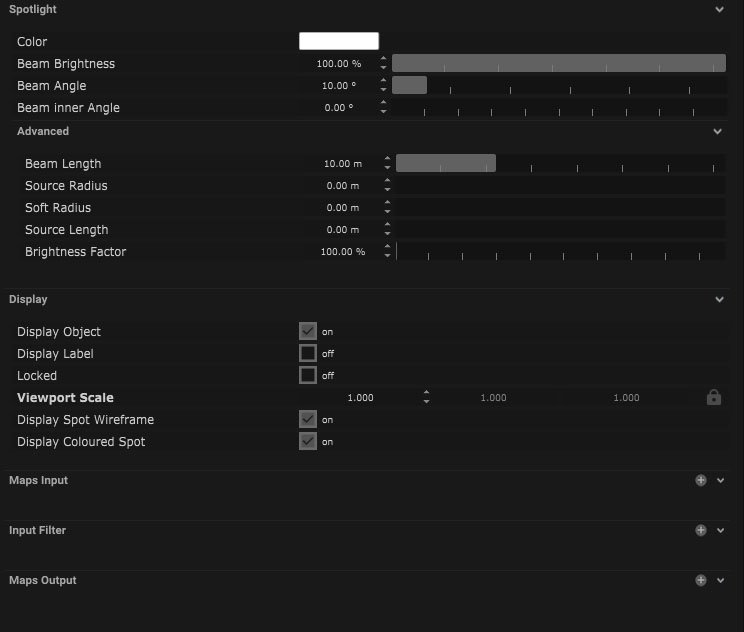
| Colour | Clicking the colour box opens a colour picker with RGB (red, green, blue) and alpha control. |
| Beam Brightness | Control of brightness from 0 to 100. |
| Beam Angle | The measurement of how the light is distributed in degrees. The larger the number the wider the beam. |
| Beam Inner Angle | The measurement of the inner beam in degrees. This can not be larger than the beam angle. |
Advanced
These are settings for the virtual spotlight within the Unreal Engine.
| Name | Description |
|---|---|
| Beam Length | Length of the beam of light in meters. |
| Source Radius | This is the distance from the center of the lens to the edge in meters. |
| Soft Radius | This is the approximate radius of the UE spotlight. |
| Source Size | This is the size of the source of the spotlight. |
| Brightness Factor | This is the % of brightness from 0 to 100. |
Display
| Name | Description |
|---|---|
| Display Object | If ticked, the object will be visible in the scene. If un-ticked, the object will not be visible. |
| Display Label | When on, there will be a label displayed next to the object. |
| Locked | When un-ticked, it activates keyboard shortcuts – pressing ‘E’ allows you to move and ‘R’ rotate. |
| Viewport Scale | Dimensions of the object in the viewport in meters. |
| Display Spot Wireframe | When ticked a wireframe of the beam is displayed. This is useful to help see the beam angle. |
| Display Coloured Spot | When ticked a coloured beam is displayed. |
Display Settings Tutorial
Mapping
Node Based
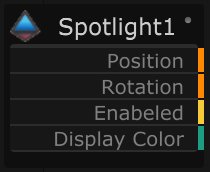
The object can be controlled and used as a node. The node is created by clicking and dragging the parameter on to the board.
| Name | Description |
|---|---|
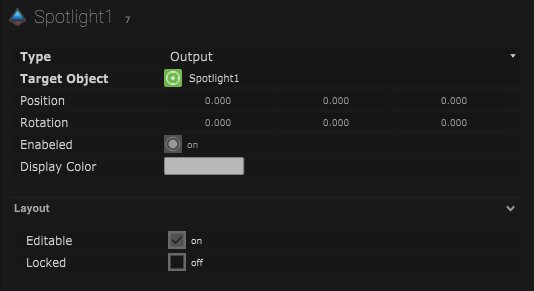
| Type |
|
| Target Object | This is the object that will either be affected by the incoming values or output information. |
| Position | The directional XYZ values will be displayed here. |
| Rotation | The rotational XYZ values will be displayed here. |
| Enabled | When on, the parameter is active and enabled. |
| Display Colour | This colour block can be changed by changing the parameter. |
Layout
| Enabled | When on, the parameter is active and enabled. |
| Locked | When on, the node is locked into its position on the board. |