FreeD is a UDP protocol that can be used to take in and output positional data of cameras.
*This is only available for Virtual Production, and Full license.
FreeD Setup
Input
| Name |
Description |
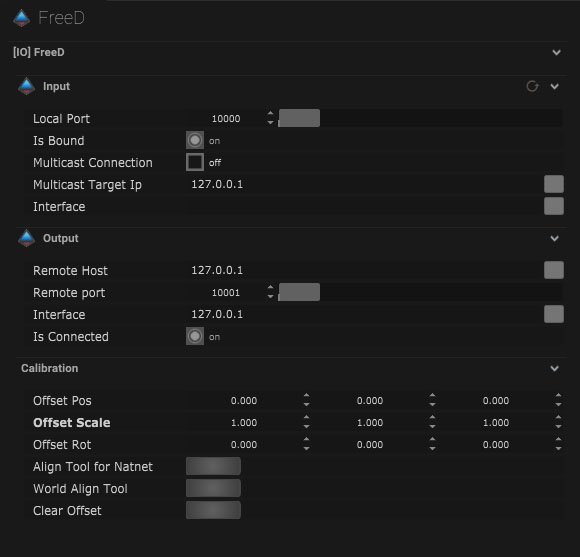
| Local Port |
This is the port that will receive data from other devices. |
| Is Bound |
This will be on when the IO connection is bound to a network. |
| Multicast Connection |
When on, data can be sent to multiple recipients. |
| Multicast Target IP |
This is where the IP address of the multicast can be entered. |
| Interface |
This is the IP address of the local network interface (NIC) which should be used for this connection. |
Output
| Name |
Description |
| Remote Host |
This is where the target IP address of the host can be input. |
| Remote Port |
This is the port that the data package will be sent to. |
| Interface |
This is the IP address of the local network interface (NIC) which should be used for this connection. |
| Is Connected |
When on, FreeD data is being output. |
![]()
* ![]() Click this icon to range the incoming Values.
Click this icon to range the incoming Values.
*Check the Calibration/Allignment Tool here.
*Monitor the timing of the incoming data packages here.
Mapping
Input
| Name |
Description |
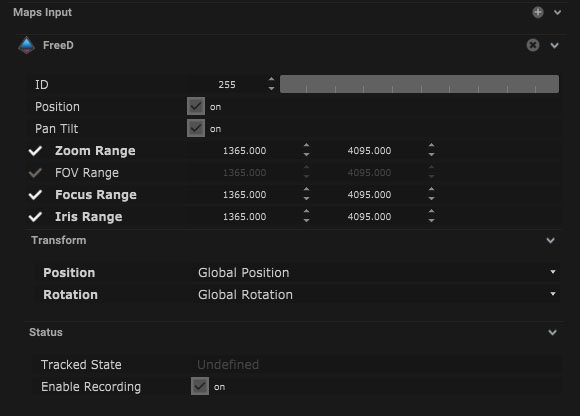
| ID |
This is the ID number of the tracking point. |
| Position |
When on, the position of the object will be affected. |
| Pan Tilt |
When on, the pan and tilt movements will be affected. |
| Test – rotation Tilt |
The tilt movement can be tested by changing the values on the dial. |
| Zoom |
When on, the zoom of the camera can be controlled. |
| FOV |
When on, the field of view of the camera can be controlled. |
| Focus |
When on, the focus of the camera can be controlled. |
| Iris |
When on, the iris of the camera can be controlled. |
Transform
| Name |
Description |
| Position |
- Global Position – The global position will be output.
- Relative Position – The relative position will be output.
- Global Effected Position – The global effected position will be output.
|
| Rotation |
- Global Rotation – The global rotation of the object will be output.
- Relative Rotation – The relative rotation will be output.
- Global Effected Rotation – The global effected rotation will be output.
|
Status
| Name |
Description |
| Tracked State |
- Undefined – When tracker does not have a map input.
- Inactive – When the tracker has a follow object input map.
- Active – When the tracker has a target object map input.
|
| Enable Recording |
When on, the tracking data can be recorded. |
![]()
Compatible input object
Output Mapping
| Name |
Description |
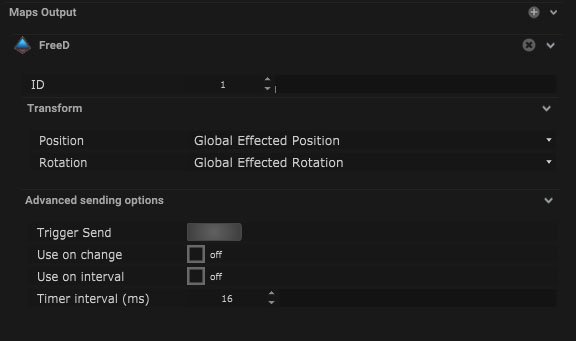
| ID |
The object ID number can be set here. |
Transform
| Name |
Description |
| Position |
- Global Position – The global position will be output.
- Relative Position – The relative position will be output.
- Global Effected Position – The global effected position will be output.
- Target Position – The target position will be output.
|
| Rotation |
- Global Rotation – The global rotation of the object will be output.
- Relative Rotation – The relative rotation will be output.
- Global Effected Rotation – The global effected rotation will be output.
|
Advanced sharing options
| Name |
Description |
| Trigger Send |
Pressing this button will send out a trigger value. |
| Use on Change |
When on, the trigger will be output in a time interval. |
| Use on Interval |
The time interval can be altered in milliseconds. |
| Timer Interval (ms) |
The time interval can be altered in milliseconds. |
![]()
Compatible output objects


 Click this icon to range the incoming Values.